WCAG 2.2 Compliant

Automated WCAG
Compliance Checker

Stop guessing if your website meets accessibility standards. Alt Audit scans your site and identifies every WCAG 2.2 violation — including missing alt text — in minutes.

Most Websites Fail WCAG — Without Knowing It

Manual accessibility audits are slow, expensive, and miss issues. Automated checking finds them all.

96%
of websites have WCAG failures (WebAIM Million 2025)
#1
most common issue: missing alt text
$50K+
average cost of an ADA lawsuit settlement

What Is a WCAG Audit?

A WCAG audit is a systematic review of a website against the Web Content Accessibility Guidelines (WCAG) published by the W3C. The audit checks every page for barriers that prevent people with disabilities from accessing content — including missing alt text on images, insufficient colour contrast, broken keyboard navigation, and missing form labels. WCAG 2.2, the current version released in October 2023, defines 87 success criteria across three conformance levels: A, AA, and AAA. Most accessibility laws worldwide — including the ADA (United States), EAA (European Union), and EN 301 549 — require Level AA conformance as the minimum standard.

Source: W3C WCAG 2.2 Understanding Docs

What WCAG Compliance Means

WCAG (Web Content Accessibility Guidelines) is the international standard for web accessibility. Meeting it protects you legally and opens your site to more users.

Level A — Must Have

The minimum requirements every website must meet. Includes alt text for all images, keyboard navigation, and no flashing content.

Level AA — Should Have

The legal standard in most countries. Required for ADA, EAA, and EN 301 549 compliance. Includes colour contrast ratios and resize support.

Level AAA — Best Practice

The highest level. Recommended for government and public sector sites. Includes sign language and enhanced contrast.

Manual vs Automated WCAG Audit

How do different audit approaches compare? Here is a side-by-side breakdown of time, cost, and coverage.

Factor Manual Audit Automated Tool Alt Audit
Time to complete 2–4 weeks Minutes Under 5 minutes
Cost $3,000–$30,000 $0–$200/month Free tier + $7/month
Coverage Sample pages only Full site scan Every image, every page
Auto-fix capability No — report only Limited AI-generated alt text
WordPress integration No Varies Native plugin

How Much Does a WCAG Audit Cost?

The cost of a WCAG audit depends on the method and scope. A manual audit by an accessibility consultant typically costs between $3,000 and $30,000, depending on site complexity and the number of pages reviewed. Automated tools range from free (limited checks) to $200 per month for enterprise-level scanning. Alt Audit offers a free tier with 25 credits per month — enough to audit a small site — with paid plans starting at $7 per month for larger sites. For context, the average ADA accessibility lawsuit settlement exceeds $50,000 according to accessibility law firm UsableNet, making proactive auditing significantly more cost-effective than litigation.

What Alt Audit Checks

Missing Alt Text

Every image on your site is scanned. We flag missing, empty, or low-quality alt text that fails WCAG 1.1.1.

Bulk Alt Text Generation

Don't just find the issues — fix them. Generate WCAG-compliant alt text for every failing image with one click.

Compliance Reports

Download a full audit report to share with clients or stakeholders. Shows compliance status, issues found, and fixes applied.

WordPress Integration

Our plugin automatically generates compliant alt text on every image upload — so new content is always WCAG-ready.
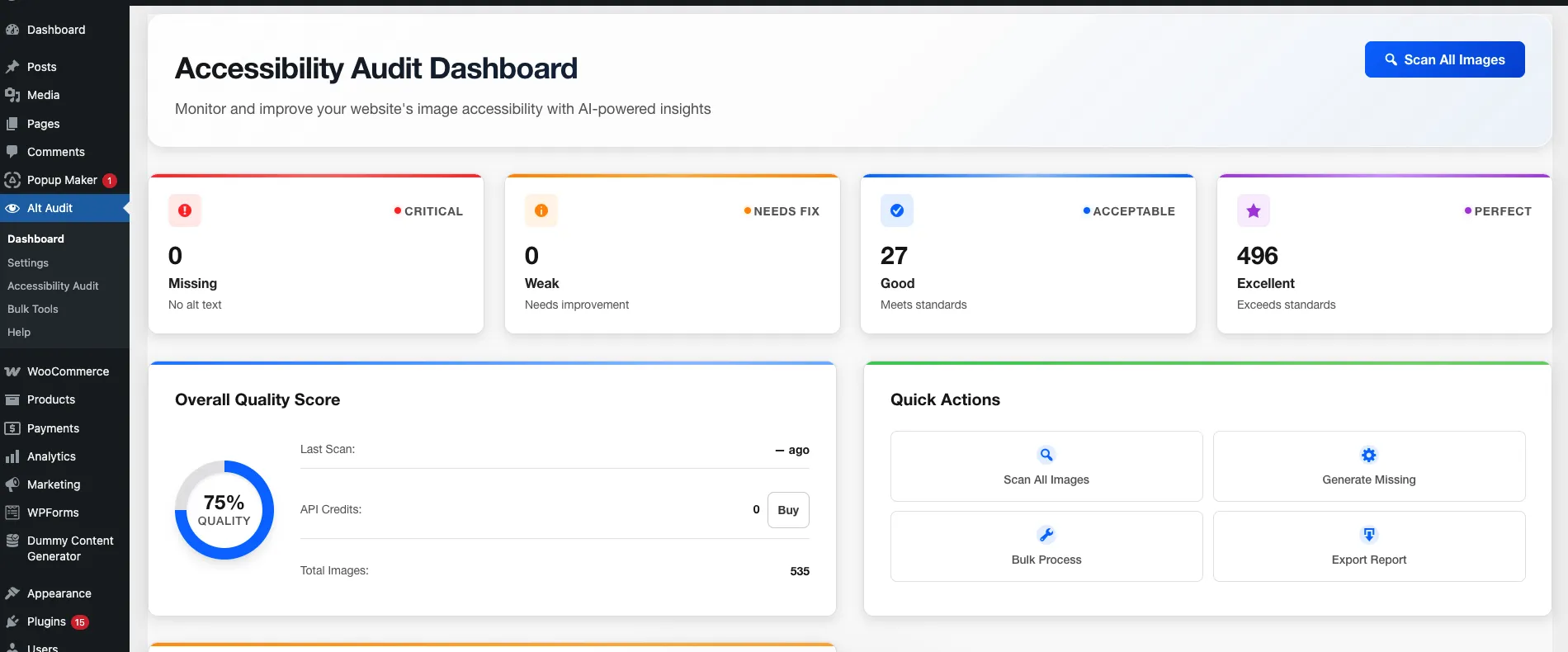
Alt Audit WordPress plugin Accessibility Audit Dashboard showing 75 percent quality score, 535 total images scanned with severity breakdown
Alt Audit dashboard showing real-time WCAG compliance status

How to Run a WCAG Audit With Alt Audit

1

Connect Your Site

Install the WordPress plugin or enter your site URL to start a scan.

2

Review Issues

See every WCAG violation categorised by severity and page.

3

Fix with AI

Generate compliant alt text automatically. Download your compliance report.

Frequently Asked Questions About WCAG Audits

WCAG 2.2, released in October 2023, adds 9 new success criteria to WCAG 2.1. The additions focus on improved mobile usability, cognitive accessibility, and consistent help mechanisms. WCAG 2.2 is backwards-compatible — meeting 2.2 also satisfies 2.1 and 2.0 requirements. Most current legislation references WCAG 2.1 AA, but the EU European Accessibility Act (EAA) effective June 2025 references the latest version.

Yes, in most jurisdictions. In the United States, the ADA Title II rule (effective April 2026) explicitly requires WCAG 2.1 Level AA for state and local government websites. The EU European Accessibility Act requires WCAG compliance for digital products and services from June 2025. In the UK, the Equality Act 2010 and Public Sector Bodies Accessibility Regulations mandate WCAG 2.1 AA compliance for public sector websites.

At minimum, run a full audit quarterly and after any major site redesign or content migration. For sites with frequent content updates — blogs, ecommerce stores, news sites — monthly automated scans are recommended. Alt Audit can run continuous monitoring via the WordPress plugin, flagging new accessibility issues as content is published.

Automated tools can reliably detect approximately 30–40% of WCAG success criteria, including missing alt text, colour contrast failures, missing form labels, and structural heading issues. The remaining criteria require manual testing — such as evaluating whether alt text is actually meaningful, or whether interactive elements are usable with assistive technology. Alt Audit focuses on image accessibility (WCAG 1.1.1) where automated detection and AI-powered remediation are most effective.

Non-compliance carries legal, financial, and reputational risks. In the US, over 4,600 ADA digital accessibility lawsuits were filed in 2023 alone, according to UsableNet. Average settlement costs exceed $50,000. Beyond litigation, inaccessible websites exclude approximately 16% of the global population — over 1.3 billion people — who live with some form of disability, according to the World Health Organization.

Fixing alt text addresses WCAG Success Criterion 1.1.1 (Non-text Content), which is one of the most frequently violated criteria. However, full WCAG 2.2 Level AA compliance requires meeting all 55 applicable success criteria, including colour contrast (1.4.3), keyboard accessibility (2.1.1), and consistent navigation (3.2.3). Alt Audit focuses on the image accessibility component — the single most common compliance gap found on 58% of the top 1 million websites according to the WebAIM Million 2025 study.

Related Compliance Resources

Use these pages to turn WCAG guidance into audits, reports, and workflows your team can actually run.

R

Written by

Rustamjon Akhmedov

Founder & Web Accessibility Specialist

Full-Stack Laravel & WordPress PHP Developer with a passion for web accessibility. Building Alt Audit to help website owners ensure every image has meaningful alt text for better SEO and inclusivity.

LinkedIn

Start Your Free WCAG Audit Today

Free plan includes 25 credits. No credit card required.

Check My Site Free

Takes less than 2 minutes to get started