Stop Writing Alt Text Manually: How AI Is Changing Image SEO Forever
Tired of manually updating alt text? Discover how AI empowers you to bulk fix alt text, streamline your alt text audit, and boost your website's accessibility and SEO.
Stop Writing Alt Text Manually: How AI Is Changing Image SEO Forever
If you've ever stared at a media library with thousands of images — all missing alt text — you know the feeling. It's somewhere between "I should fix this" and "this is going to take forever." You're not wrong on either count.
Alt text isn't optional. It's the bridge between your images and the people (and bots) who can't see them. Get it right, and you boost your SEO, pass accessibility audits, and make your site usable for everyone. Get it wrong — or skip it entirely — and you're leaving real value on the table.
The good news? You no longer have to do it manually.
Why Alt Text Actually Matters
Let's start with the basics, because this part often gets glossed over.
When a screen reader encounters an image on your site, it reads the alt text aloud to the visually impaired user. If that field is empty, the user gets nothing — or worse, a garbled filename like IMG_20231104_152301.jpg. That's not just unhelpful; it's a barrier.
For search engines, it's a similar story. Google can't "see" your images the way a human can. Alt text is how you tell it: here's what this image shows, and here's why it matters on this page. Without it, your images are essentially invisible to image search — and that's organic traffic you're missing.
There's also a legal angle. WCAG 2.1 Level A (Success Criterion 1.1.1) requires non-text content to have a text alternative. More regions are enforcing web accessibility standards every year, including the EU's European Accessibility Act. The question isn't really if you'll need to fix your alt text — it's when.
The Problem with Doing It Manually
For a site with 50 images, manual alt text is fine. For a site with 5,000? It becomes a project. For 50,000? It becomes a crisis.
Here's what manual alt text management actually looks like in practice:
- You identify missing alt text by crawling your site (or just guessing which pages are problematic)
- You open each image one by one in the media library
- You write a description, try to weave in a keyword naturally, and save
- You repeat this hundreds or thousands of times
- New images get uploaded next week — and the cycle starts again
It's not that it can't be done. It's that it shouldn't have to be done this way. There are better tools now.
What AI-Powered Alt Text Generation Actually Does
Modern AI doesn't just slap a generic label on your image. The best tools use computer vision to analyze the actual content of the image — objects, scenes, context — and generate a natural language description that reads like something a human wrote.
Here's the rough process:
- Image recognition — the AI identifies what's in the image: a product, a person, a landscape, a chart
- Context awareness — it factors in surrounding information like the page title, product name, or focus keyword
- Natural language generation — it turns those observations into a coherent, useful description
The result isn't perfect 100% of the time, but it gets you 80–90% of the way there — and that's the difference between a project that takes months and one that takes an afternoon.
How Alt Audit Does It Differently
Most alt text tools make you choose: pay for AI, or do it yourself. Alt Audit takes a different approach.
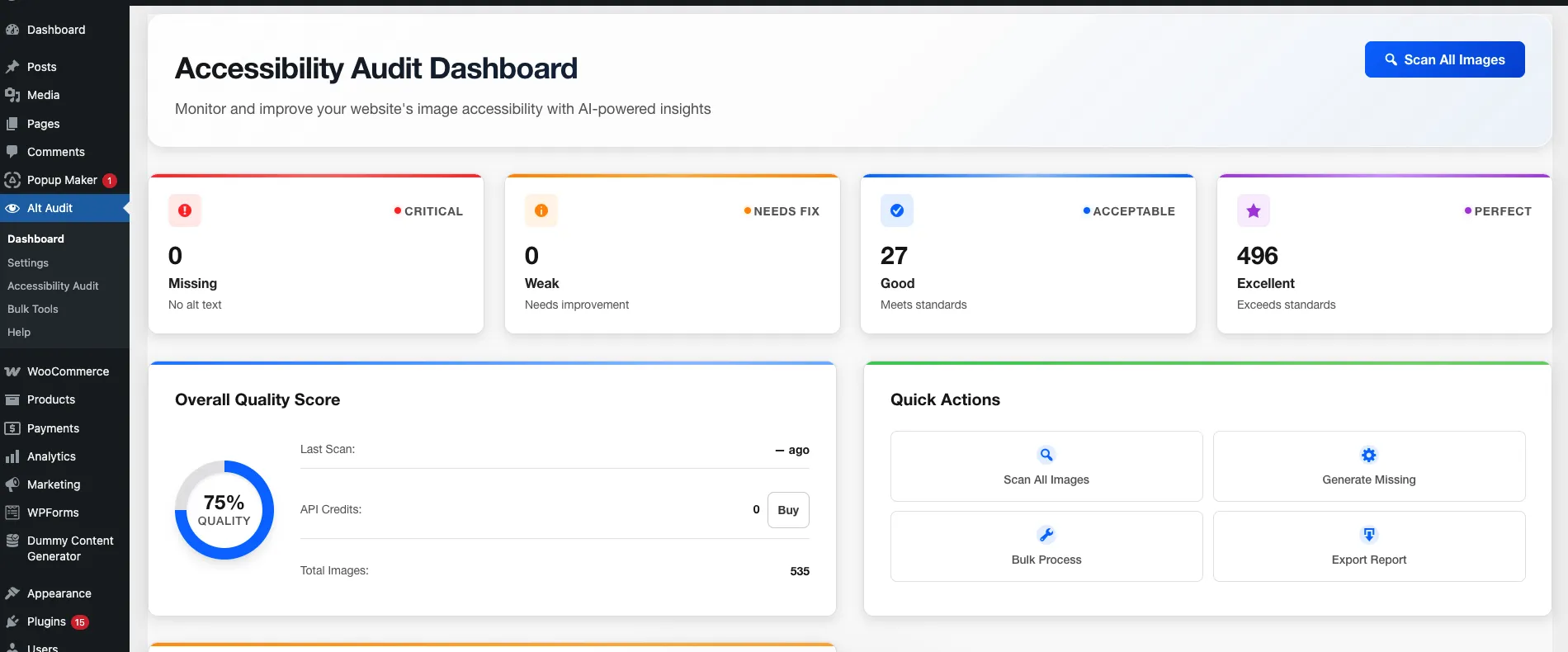
The Free Tier Is Actually Free
The core of Alt Audit is rule-based generation — and it's completely free, unlimited, and works entirely offline. No API key, no external service, no monthly subscription.
You create templates using dynamic variables: {site_name}, {page_title}, {product_title}, {image_filename}, and more. Alt Audit fills them in automatically based on the context of each image. For a WooCommerce product, it knows to pull the product title. For a blog post, it uses the post title. It adapts.
This alone handles the majority of alt text needs for most sites — especially large libraries where images follow predictable patterns.
Five Quality Levels, Not Just "Missing" or "Present"
Alt Audit doesn't treat alt text as binary. It scores every image across five statuses:
- Missing — critical, fails WCAG
- Decorative — appropriately marked as decorative
- Weak — present but unhelpful
- Good — acceptable
- Excellent — optimal
This matters because "has alt text" isn't the same as "has good alt text." A field that says "image" technically exists but does nothing for SEO or accessibility. Alt Audit shows you the full picture.
AI Generation for Complex Images
When rule-based templates aren't enough — infographics, lifestyle photography, complex product shots — you can opt into the AI-powered generation. This uses computer vision to analyze the actual image content and write a description that no template could produce.
The AI tier supports 130+ languages, automatically pulls focus keywords from Yoast SEO and Rank Math, and generates descriptions that are genuinely contextual. New accounts get 25 free credits to test it, with no subscription required — just pay-as-you-go credits when you need them.
It Lives Where You Already Work
Alt Audit integrates directly into WordPress rather than requiring you to export/import data through some external dashboard:
- Gutenberg gets real-time quality indicators on image blocks as you write
- Classic Editor shows a meta box for per-post auditing
- Media Library gets inline editing, quality badges, and bulk actions right in the grid
There's no separate workflow to learn. The audit happens where the images are.
A Practical Workflow for Fixing Alt Text at Scale
Here's how to approach a large-scale alt text cleanup using Alt Audit:
1. Run the audit. Open the Alt Audit dashboard and scan your media library. You'll immediately see a breakdown of Missing, Weak, Good, and Excellent images — prioritize the Missing and Weak ones first.
2. Set up your free templates. Configure rule-based templates for your main content types. A WooCommerce store might use {product_title} – {site_name}. A blog might use {image_filename} from {page_title}. This handles the bulk of your library instantly.
3. Use AI for the exceptions. Run AI generation on image categories where templates fall short — product lifestyle shots, team photos, custom graphics. Use your 25 free credits to sample the quality before committing to a larger batch.
4. Review before publishing. This step is non-negotiable. AI is fast, but it isn't infallible. Spot-check a sample, edit anything that feels off or too generic, and make sure important pages use keywords naturally.
5. Set up ongoing maintenance. New images will keep coming. Alt Audit's media library integration means every new upload gets flagged immediately if it's missing alt text — so you don't let the problem rebuild itself.
The Accessibility Angle Isn't Optional Anymore
The European Accessibility Act came into effect in June 2025, requiring businesses that sell to EU customers to meet digital accessibility standards — including WCAG 2.1 Level A for images. Similar legislation is expanding in the US and UK.
Alt text is one of the most straightforward wins in web accessibility. It doesn't require a site redesign or a developer. It's metadata. And Alt Audit makes it something you can actually audit, fix, and maintain — rather than something you know you should do but never quite get around to.
Bottom Line
If your site has more than a few hundred images, manual alt text management isn't a strategy — it's a backlog. AI-powered tools like Alt Audit exist precisely to close that gap: handling the bulk of the work automatically, surfacing the images that need attention, and integrating directly into the workflow you already use.
The free tier alone is worth installing. The AI capabilities are there when you need more. And the quality scoring means you always know exactly where you stand.
Alt Audit is a WordPress plugin for bulk alt text management, image SEO, and WCAG 2.1 accessibility compliance. The core rule-based generation is free, unlimited, and requires no API key.
Written by
Rustamjon Akhmedov
Founder & Web Accessibility Specialist
Full-Stack Laravel & WordPress PHP Developer with a passion for web accessibility. Building Alt Audit to help website owners ensure every image has meaningful alt text for better SEO and inclusivity.
LinkedInPut the WordPress workflow into production
Connect article advice to the plugin, documentation, and a plan that fits your site volume.
Related Reading
Keep following the same topic with articles that connect naturally to this one.
March 3, 2026
Bulk Fix Alt Text with AI: A Comprehensive Guide to Efficient Image Optimization
Struggling with missing or inadequate alt text? Discover how AI can automate bulk alt text fixes, boosting SEO and accessibility.
March 15, 2026
Best WordPress Alt Text Generator Plugins in 2026 (Compared)
Looking for the best WordPress alt text generator plugin? We compare the top AI-powered options to help you automatically generate descriptive alt text for your images, improve SEO, and meet WCAG accessibility requirements — without writing a single word manually.
November 4, 2024
Complete WordPress Alt Text Optimization Guide: Plugins, Workflows & Best Practices
Master WordPress alt text optimization with our complete guide. Learn about the best plugins, automated workflows, and proven strategies to improve accessibility and SEO.
Ready to Optimize Your Alt Text?
Start with our free AI-powered alt text generator. Get 25 credits monthly with no credit card required.
Start Free Today